
I’m delighted to present my contribution to the Festive Tech Calendar which is now in it’s sixth year. Thanks to all the event organisers for pulling together so much fantastic content once again, it just continues to get bigger and better each year. Well done everyone.

This year, I have chosen to write a post on Azure Business Continuity Center which has very recently gone into general availability. If you’ve read my blog before you will know that I am a fan of Azure Backup Center especially when it comes to MSPs who are managing multiple Azure customers via Azure Lighthouse. Well, some sad news is that Azure Backup Center will shortly be disappearing but the good news is that Azure Business Continuity Center (let’s call it ABCC) will be the replacement service!
The concept is simple enough, ABCC will still continue to offer the same reporting functionality on your Azure Backup services but will also include Azure Site Recovery to give you a full unified overview of your entire BCDR portfolio. This will include protection coverage, security, governance and management service overviews. If you are already using Azure Lighthouse to manage multiple tenants then you can easily manage select the required subscriptions that you need to report on all from within the ABCC of your management tenant. This makes ABCC a single central point of management for multiple customers with quick access to essential settings and reporting functionality.

At the time of writing, ABCC has support for the following Azure Backup scenarios:
- Azure VM backup
- SQL in Azure VM backup
- SAP HANA on Azure VM backup
- Azure Files backup
- Azure Blobs backup
- Azure Managed Disks backup
- Azure Database for PostgreSQL Server backup
- Azure Kubernetes services
…and the following Azure Site Recovery scenarios:
- Azure to Azure disaster recovery
- VMware and Physical to Azure disaster recovery
The only pre-requisite is that you have enabled some of these services already via either Recovery Services Vaults or Backup Vaults as both are supported here.
When using ABCC, you will find various filters to narrow the focus view to particular scenarios such as the above supported list, or to particular Azure subscriptions or regions.
BCDR Protection
Starting with protection coverage, this area provides you with two “at a glance” style inventory views. One view provides a basic overview of what type of protection you have enabled per resource. The other view will provide a list of protectable items where a BCDR solution is not yet in place.
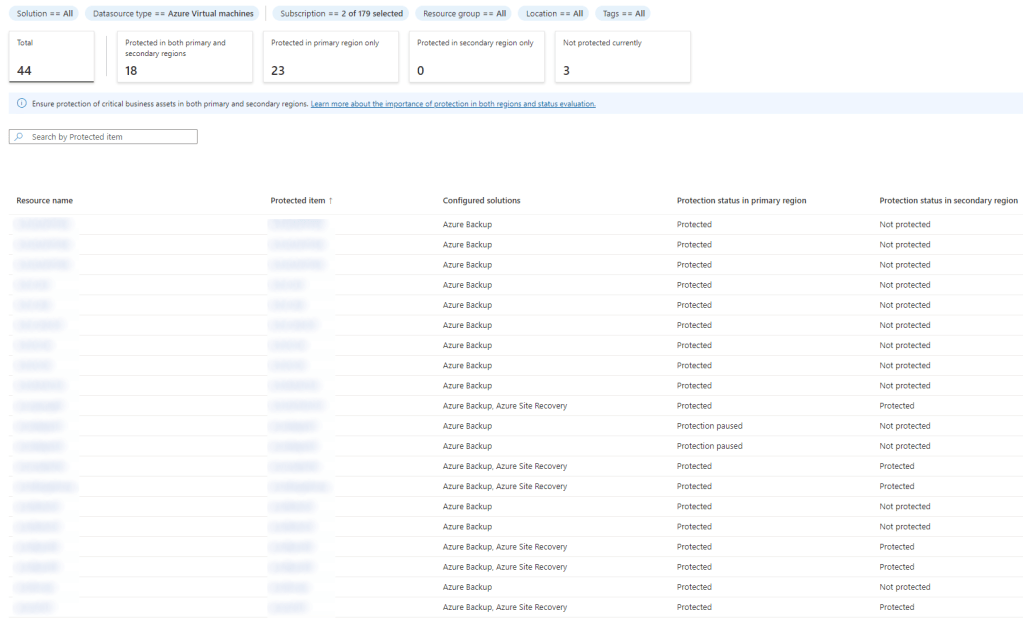
Focussing on virtual machine protected items for a moment, we can see a quick summary of all virtual machines that are protected in the primary region and also the status of the protection coverage in the secondary region. This could be where ASR is enabled with replication to a secondary region or where Azure Backup has geo-redundant storage configured.
This is summarised in numbers just below the filtering options and then beneath that you will find a resource list with the applicable status against each item. You can click into each resource to take you directly to that item.
If you see something missing from the list, you will find a quick option to ‘Configure Protection’ from the very top of the screen.
If you need to restore something, then there’s also a quick button click for this also to save you navigating into the corresponding vault or virtual machine resource.
Monitoring
There is a dedicated monitoring section which primarily in my opinion you will use for the alerts function. This is a unified alerts management pane where you can manage alerts for both Azure Backup and ASR related incidents. As before, you will be able to drill-down into these alerts to the resource level with just a couple of clicks.

You also have a view of all of your backup and replication job status’ here where you can view the success or failure of previously scheduled backups or any issues with ASR replication.
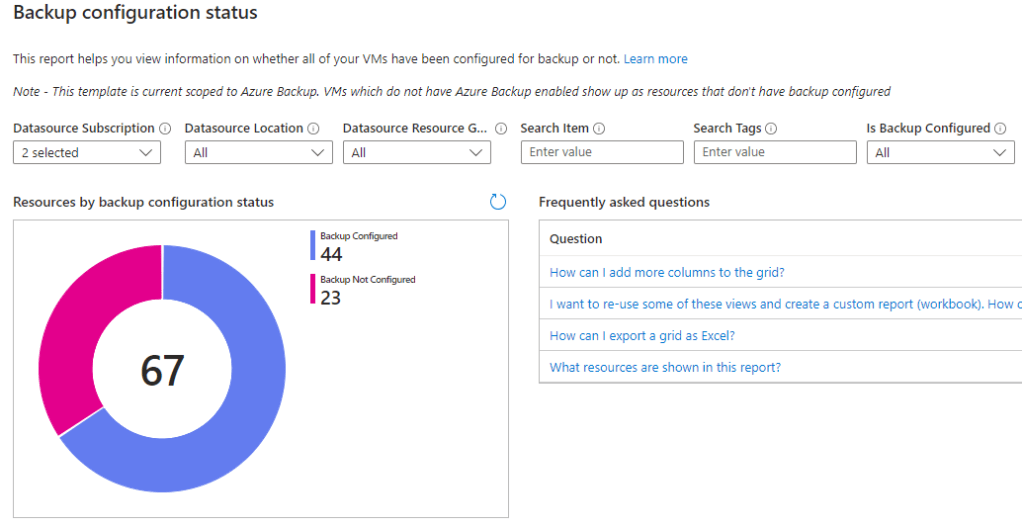
If you had configured Backup Reports previously via the ingestion of vault diagnostics into Log Analytics then you will be pleased to find that Backup Reports are still available and can now to be found in the monitoring section of ABCC.
There are also a number of new Azure Workbooks available here to help you to monitor your backup posture.
Security
The security section offers an interesting insight into the security posture level of your Recovery Services vault or Backup vault. This is a vault level setting, so any resources associated with the same vault will have the same security level result.
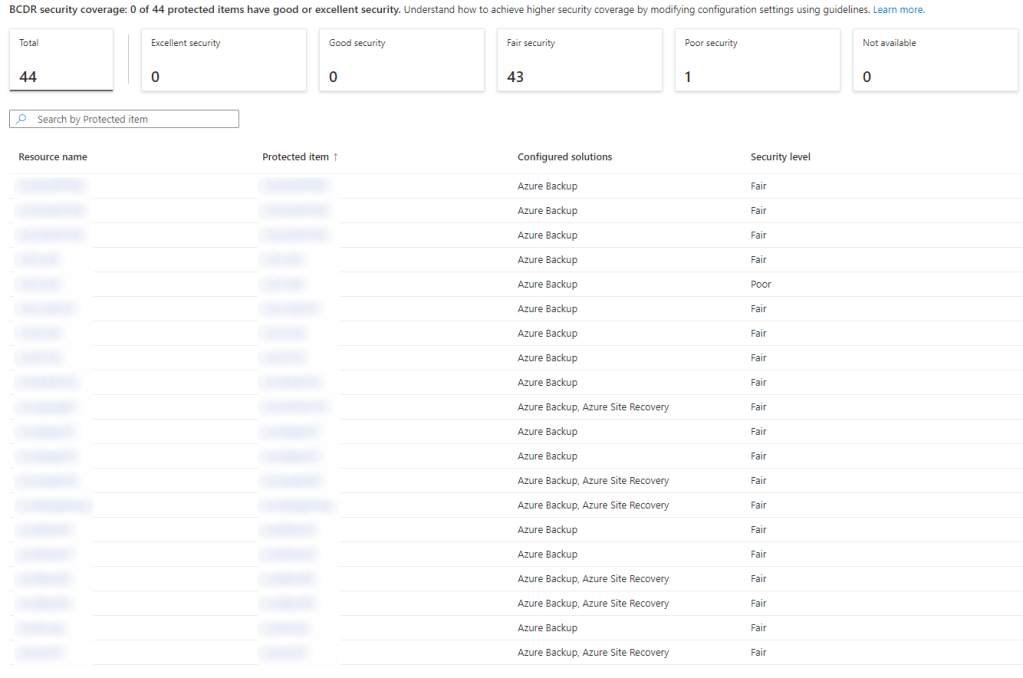
In terms of the security level reported, there are four possible results depending on how you have configured your vault security settings. These results carry the following feature requirements:
| Excellent | Immutability or soft-delete vault setting must be enabled and irreversible (locked/always-on). Multi-user authorization (MUA) must be enabled on the vault. |
| Good | Vault Immutability enabled (does not have to be locked) |
| Fair | Multi-user Authorization (MUA) enabled |
| Poor | No security features enabled |
If you wish to increase the security level, you will find quick links into the vault security settings but please remember that these security settings are set at the vault level. Therefore, any changes will have an impact on all backups within that vault. Furthermore, some settings such as locking vault immutability are irreversible so will need to be carefully considered before enablement.
Governance
The governance section of ABCC will bring you to a filtered list of Azure Backup and Site Recovery related Azure Policies. Here, you can manage your BCDR policies and compliance directly from within ABCC, a useful shortcut if nothing else.

Management
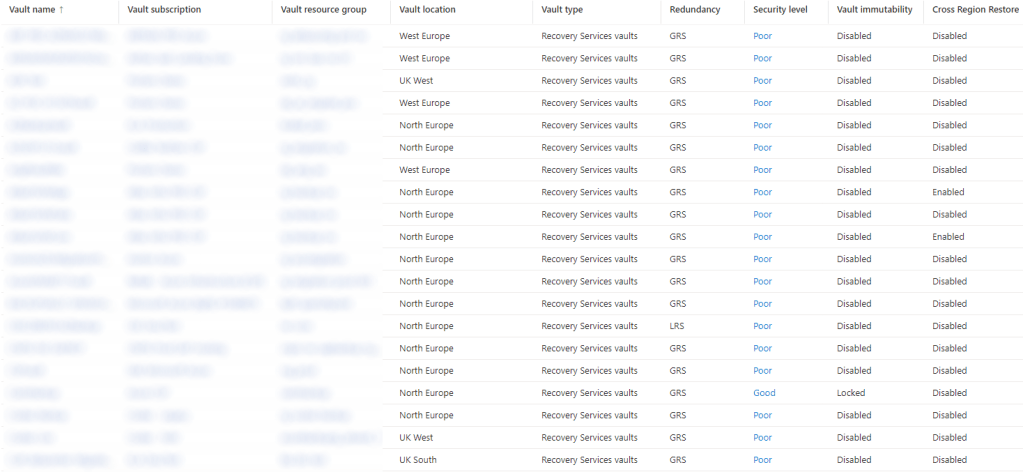
For me, this is where management at scale really becomes easier by using ABCC. You can get a high-level overview of your vaults including details of the redundancy level, security level (from earlier), vault immutability and cross-region restore status.
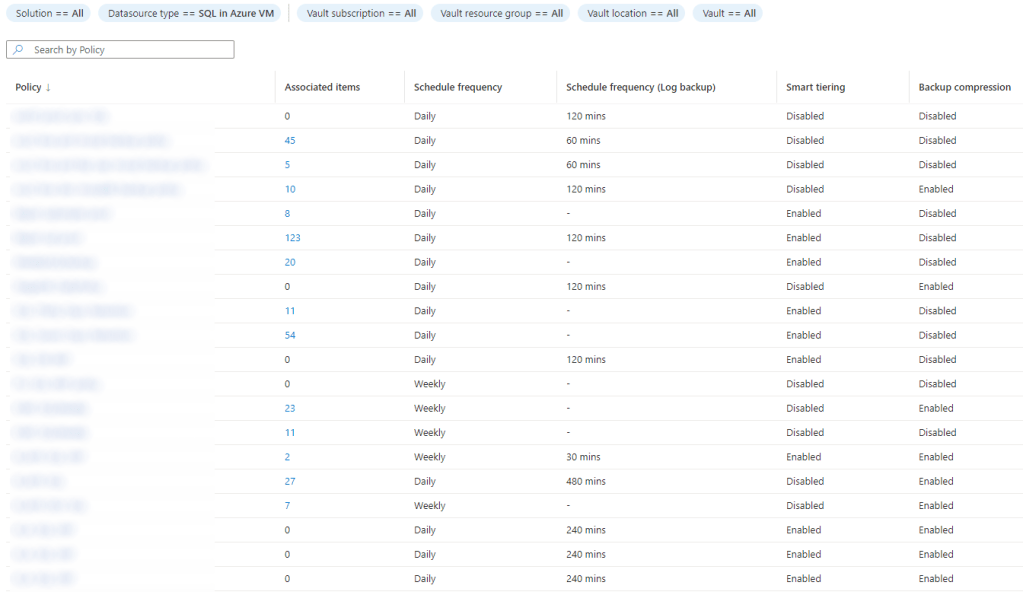
You can also view your protection policies at scale including how many associated resources are using each policy. I like how you can filter based on backup type and see a tailored view with the corresponding backup settings such as in this example of SQL Server Azure VMs below.
Conclusion
You can tell ABCC is designed as a central access point for all things relating to business continuity. Although it’s possible to manage these services without ABCC, it certainly makes life easier by pulling all related settings and content in to a single overview. I found I was able to configure any settings within just a few clicks without ever having to leave ABCC and go and find the corresponding vault or backup resource.
At scale, this service is an absolute must and it should help you to become more consistent with your service settings and to manage and monitor your BCDR services more efficiently.
To wrap up this post I thought I’d lay out the benefits of using ABCC as I see them in bullet point form:
- Unified reporting for both Azure Backup and Azure Site Recovery for complete BCDR posture coverage
- Centralised monitoring and alerting of job status and issues
- Vault level security posture overview
- Backup policy overview and association by resource
- Audit compliance overview
- An essential tool for MSPs managing multiple customer tenants via Azure Lighthouse
- No cost for service
 azurealan.ie
Great post. keep sharing such a worthy information.
DevOps with Multi Cloud Training in KPHB
LikeLike