
Microsoft recently dropped Azure Virtual Network Routing Appliance (VNRA) into public preview with surprisingly little fanfare. As a new Azure networking service, it left many of us asking: What is it used for? When would I deploy this?
At the time of writing, documentation on Microsoft Learn is extremely limited apart from an overview page and a brief how to deploy page. What we do know about it is that it’s not just another Virtual Machine based appliance even if the infrastructure is abstracted from the user to deliver this as a PaaS solution. Microsoft Learn describes this as running on specialised networking hardware and designed for high throughput, low latency east-west traffic flows.
In the current preview you can choose options of 50, 100 or 200Gbps and deploy up to two instances per subscription. That’s fast, but of course we are still limited by the bandwidth of our endpoints, e.g. many Azure virtual machines will not go anywhere near this high. So what is this used for?
A solution to non-transitive VNet peering?
The primary use case that comes to mind, or at least where I have seen certain challenges in the past (usually based on poor network architecture) is that this can solve the issue of transitive routing between Azure virtual networks.
In a nutshell, this is where Azure VNets that are not directly connected, cannot route to each other. In the example below, VNet B acts as the hub network with a VNet peering to all spoke networks. VNet B can route to all peered spoke VNets but they cannot route to each other as VNet peering is non-transitive by design. Instead, they must traverse the hub VNet and use a router of some kind that forwards the traffic to another network.
This is now standard practice to implement a hub and spoke topology like this and the router in the hub VNet will be your firewall, either Azure Firewall or an NVA of some kind.
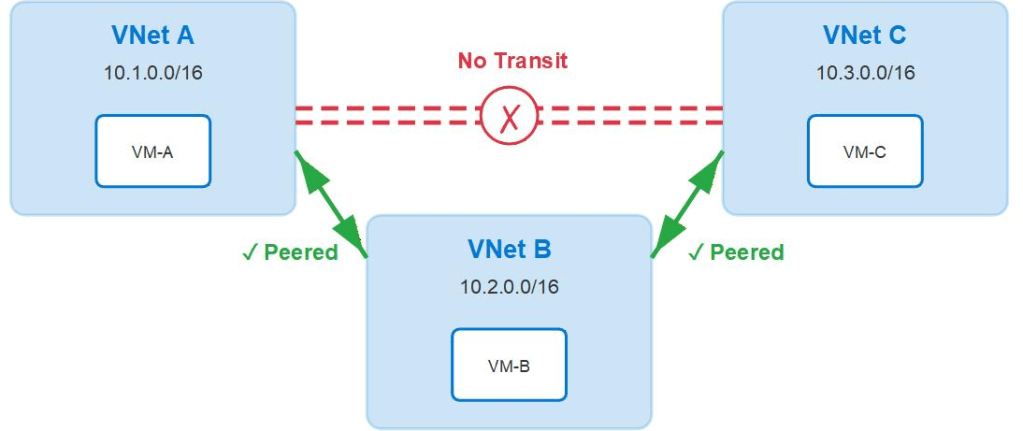
What’s wrong with this current design? Absolutely nothing. This is the standard secure zero trust model that I would almost always implement. The firewall is not only a router but it is also filtering your traffic including east-west traffic so long as you have designed your routing to send everything to the firewall.
Does Azure Virtual Network Routing Appliance replace the firewall?
As a router, possibly but then you completely lose all security inspection, filtering, and logging capabilities.
Sending everything to the firewall is a best practice if you want to implement zero trust and implement additional benefits like centralised logging and policy enforcement. The downside to this, in some cases, is that you could end up sending large volumes of network traffic through these appliances. If you have opted to go with Azure Firewall then you will benefit from increased scaling performance as this service can auto-scale based on demand but it’s not instant and you may hit throughput bottlenecks during scale out operations. You can now pre-scale these instances if your demand is consistent or predictable but that’s expensive. NVAs have an even bigger challenge here as you have to pre-build your instances based on expected demand and scale up the VM SKUs to handle the expected throughput. In reality, I still see a lot of customers only firewalling their north-south traffic which would obviously reduce the amount of traffic traversing the firewall if all east-west traffic goes direct to the destination network.
A possible hybrid option?
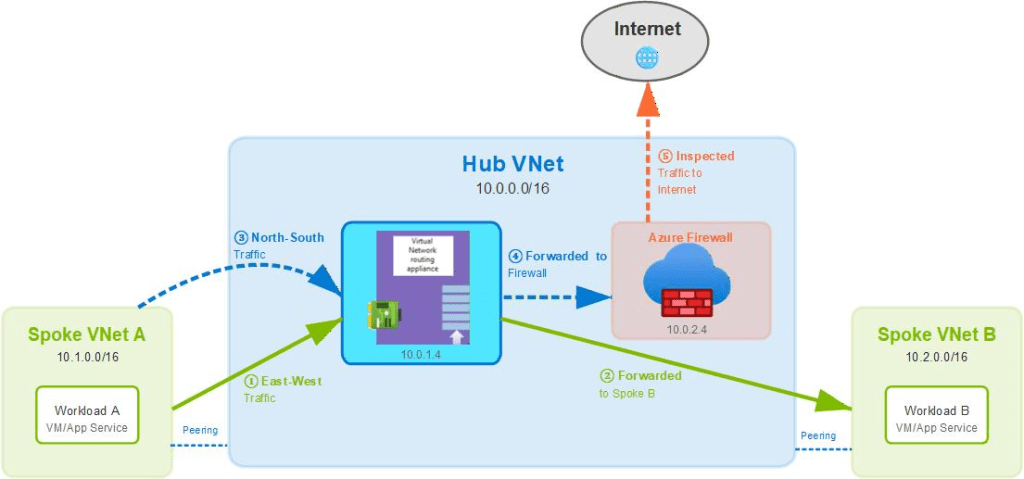
In theory, you could deploy both a VNRA and a firewall to the same VNet. Routing is still controlled as normal; system routes, propagated BGP routes and user-defined routing.
Therefore, you could make a choice with your UDR routing:
- Send east-west traffic to the VNRA and north-south traffic to the firewall/gateway, or
- Send everything to the VNRA first and have it forward north-south traffic to the firewall/gateway and east-west traffic to the destination Azure VNet (depicted below)
Deployment
The deployment (as it stands), is extremely simple. You will need to deploy to one of the currently supported preview regions and choose the target virtual network. A new dedicated subnet called
VirtualNetworkApplianceSubnet will need to be created. You must also choose the required capacity from the available options, presumably pricing will vary based on the required bandwidth. It’s currently free of charge while in public preview.
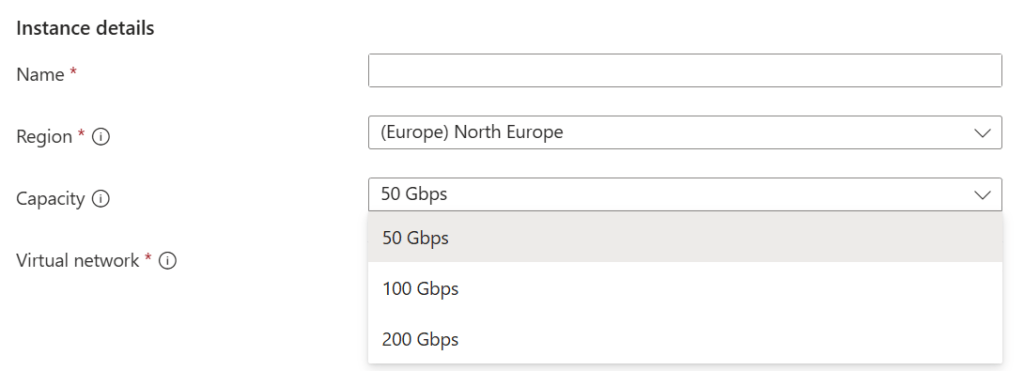
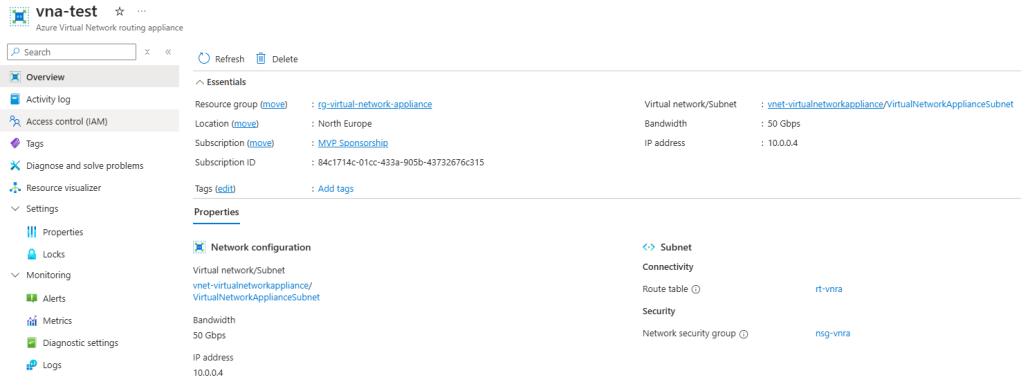
The deployed service itself has no configurable settings. You can apply an NSG and a route table to the subnet but there is nothing to configure on the service level.
Currently, there is very limited support outside of the scenario that I have already outlined with no support for the following:
- No Private Link support
- No IPv6 support
- No Global VNet peering support
- No metrics or logging data available
Routing works the same way it always does in Azure; you will have to add any new routes or override learned routes with user-defined routes to steer your traffic to the IP address of the VNRA instance.
For example, my spoke VNet A does not know the route to spoke VNet B as it is not directly peered so I can add a route for VNet B’s address prefix and send it to the VNRA as a next hop virtual appliance (10.0.0.4).
The VNRA will then forward this traffic to spoke VNet B as it has learned this route through VNet peering; just make sure to add a return route back from VNet B to the VNRA via its own route table. I can send all other unknown routes to my Azure Firewall (10.0.2.4) via a 0.0.0.0/0 default route; this ensures that all other traffic to unknown networks gets inspected by the firewall.

If you are going to decide to route all traffic via the VNRA as a next hop then you will need to make sure that the VNRA knows where to send any north-south traffic by adding the appropriate UDRs to its own route table.
As an example below, from my VNRA instance I am sending my on premises traffic to a VNet Gateway and sending everything else to my Azure Firewall.

In reality, will I use it?
Right now, I don’t see this as a service that I will ever need to include by design. It might have some niche use cases where there’s a challenging transitive routing problem on some legacy design and this will serve as a “quick fix” type solution but it will depend on what the cost is once GA pricing for this service is announced. There might be some other use cases also if and when private link is supported and large volumes of traffic don’t need to be firewalled but I haven’t come across anything that actually requires this so far, even with larger customers.
Microsoft is positioning this primarily as a high throughput and low latency hardware based service so as per some other early blogs I’ve read on this, it’s likely that Microsoft is utilising this themselves as customer zero to boost performance for their own services. It will be interesting to see if there is much uptake on this in the customer space once it goes into general availability and what additional use cases come to light, if any?
 azurealan.ie