
If you’ve been running Network Virtual Appliances in Azure for a while, this is one you’ll want to pay attention to. Microsoft are in the process of rolling out the Microsoft Azure Network Adapter (MANA) to existing VM size families, with the deployment scheduled to begin on 1st August 2026. For most workloads, this is a non-event and you’ll get some performance benefits for free. For NVAs though, it’s a different story and there are some real actions to take ahead of the deadline.
This post is my attempt to summarise what’s actually changing, why NVAs are uniquely affected, what the major vendors are saying, and what you should be doing about it.
What is MANA?
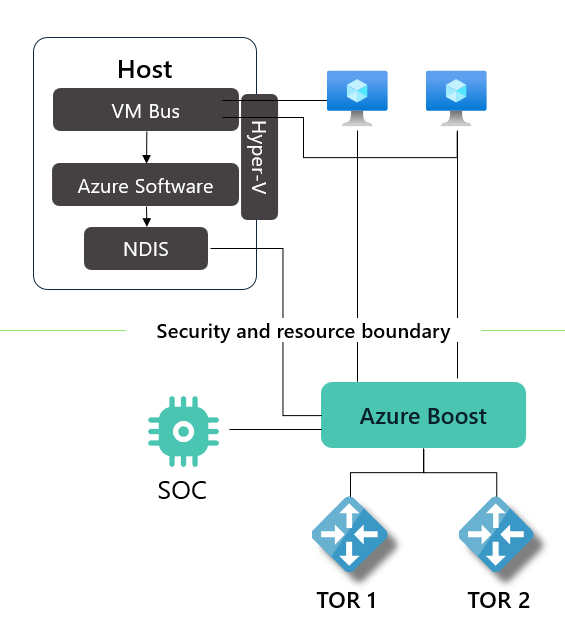
MANA stands for Microsoft Azure Network Adapter. It’s the next-generation network interface that ships as part of Azure Boost. Microsoft introduced it back in February 2025 alongside the Intel v6 family of VM sizes (Dv6, Ev6 etc). The hardware and drivers are engineered by Microsoft themselves rather than being based on third party silicon like the previous Mellanox NICs.
The benefits, when fully supported by your operating system, are pretty compelling. We’re talking sub-second NIC firmware upgrades, higher throughput, lower latency, improved security, and the Azure Boost data path accelerations. If you’ve been keeping an eye on the newer v6 (and now v7) SKUs, this is what’s been quietly powering them.
So far, all good. MANA has been available on the newer SKUs and you opted into it by choosing one of those sizes. What’s changing now is that MANA is being extended to the existing VM sizes too.
What’s changing for existing VM sizes
From 1st August 2026 onwards, Microsoft will start deploying MANA-capable hardware in regions to support the existing VM size families. The list of affected families is long but as a flavour, it includes the Bsv2, Fsv2, D(s)v2 and the D/E(s)v3-5 series among others. If you’re running general purpose VMs on anything older than v6, you should assume your workload could be in scope.
A few important points to bear in mind:
The rollout isn’t restricted by region. Once MANA hardware lands in a region, your VMs may be deployed onto it based on capacity. There’s no region-by-region phased schedule you can plan around.
Existing VMs won’t immediately move. A deallocate and start or a redeploy operation is what potentially triggers placement onto the new hardware. So routine maintenance, a resize, a restore or even a hardware-induced reallocation by Azure could end up placing your VM on MANA-capable hosts.
If your operating system doesn’t support MANA, Azure won’t refuse to run your VM. The networking will simply fall back to NetVSC and you’ll get performance roughly comparable to the previous generation Mellanox ConnectX cards. So your workload still works, it just doesn’t get the Azure Boost benefits. The exception to that is workloads with very high concurrent connection counts, which can experience degraded performance.
For most VMs running a reasonably modern Windows or Linux image from the Marketplace, this is genuinely a non-event. Microsoft have been quietly upstreaming MANA support into Windows and the Linux kernel for some time. Kernel 5.15 includes the basic MANA driver, kernel 6.2 adds InfiniBand/RDMA and DPDK, and kernel 6.14 is required for full DPDK support. Recent Windows images from the Marketplace also include the necessary drivers.
So the impact for most general purpose workloads is somewhere between “nothing” and “slightly faster networking for free”. Where it gets more nuanced is when we look at NVAs.
Why NVAs are different
Network Virtual Appliances sit in a unique spot. Unlike a typical application VM that consumes networking, an NVA is the networking. From my experience, once deployed and configured you don’t want to mess with the underlying Azure configuration. Certainly performing VM resizes to different families was always a no-go area. Virtual Firewalls, SD-WAN appliances, routing appliances and the like typically need to push significant traffic and many of them, Palo Alto VM-Series included, rely on DPDK (the Data Plane Development Kit) for their fast path. DPDK lets the appliance talk directly to the NIC and process packets without involving the Linux kernel, which is what gets you the line-rate throughput these products advertise. The catch is that DPDK needs a driver that understands the underlying NIC. If the driver doesn’t support MANA, the NVA falls back to a slower kernel-based path.
In real terms, that means throughput can drop dramatically, latency goes up, and you can end up with a firewall or router that’s nominally healthy but actually a bottleneck in your hub-and-spoke topology.
This isn’t a theoretical concern either. Palo Alto have already published a customer advisory stating that VM-Series and AIRS firewalls running PAN-OS versions earlier than 12.1.5 drop back onto the mmap synthetic path if paired with a MANA NIC, with a quoted 50% or greater reduction in maximum firewall throughput. That’s a serious hit for any production deployment and it could happen unannounced just from performing a deallocate and start operation.
Even if you haven’t changed anything in your NVA deployment, a routine restart after 1st August 2026 could quietly land you on MANA hardware and halve your throughput. That’s not the sort of surprise anyone wants on a Monday morning.
Where the major NVA vendors stand
Each vendor is at a different stage of MANA readiness so it’s worth checking with your vendor for your specific product and version. Here’s a high level summary of what the big three are saying at the time of writing but links to the full articles are provided at the end of this post.
Palo Alto Networks have published a customer advisory recommending an upgrade to PAN-OS 12.1.5 or later. This version includes native MANA support via optimised DPDK drivers. Anything below 12.1.5 on VM-Series or AIRS will hit the throughput degradation I mentioned above. The advisory also touches on whether Panorama and Log Collector VMs are affected, which they shouldn’t be unless they have accelerated networking enabled on their data interfaces.
Fortinet added MANA support in FortiOS 7.6.1. The Fortinet documentation specifically notes that “FortiOS 7.6.1 supports the use of MLX5/4 and the upcoming MANA NIC on Azure Dv6/Ev6 instance types”, but the same applies once MANA lands on the older SKUs you may be running FortiGate-VM on.
Check Point have published an article covering MANA support for their Cloud Firewall products. I’d recommend logging into the Check Point portal and reading the full article for the supported versions and any deployment caveats specific to your environment.
If you’re using a different NVA vendor or a managed service NVA, you’ll need to reach out to your provider directly.
The LegacyVMNVA tag: your temporary opt-out
Microsoft have recognised that not everyone will be ready by 1st August 2026 and so they’ve provided an opt-out mechanism in the form of a tag called LegacyVMNVA. When this tag is applied to an NVA VM or VM Scale Set, Azure will not place that resource on MANA-capable hardware, at least not yet! Azure Advisor is even raising this as a recommendation against affected NVAs.

A few important details on this:
The tag has to be in place before 1st August 2026. A Microsoft Learn article explicitly says that “VMs that are created or tagged after this date may be placed on MANA-capable hardware.”
The tag is honoured until 31st May 2027. After that date, Azure ignores it entirely and all MANA-eligible VM series will be placed on MANA hardware regardless. So this is a reprieve and not a permanent escape hatch.
The good news is you don’t need to apply the tag manually across every NVA. Microsoft have provided a built-in Azure Policy definition called “Adds a tag to Network Virtual Appliances (NVAs) VMs and Virtual Machine Scale Sets for MANA support”. This policy can be assigned at root management group, management group, subscription or resource group scope and it will tag the matching NVA workloads for you. The logic in the policy scopes the tag application to specific NVA publishers and product IDs in the Azure Marketplace, so it won’t tag every VM in your tenant.
For NVAs that you’ve deployed from a custom image or directly from the vendor (rather than from the Marketplace), you’ll need to apply the tag yourself or work with your vendor to update their deployment templates, i.e. don’t rely on the aforementioned Azure Policy.
Important note: After applying the tag, existing VMs need to be deallocated and started again for the tag to take effect on placement.
Once in place, the tag should look like this. Just don’t forget to deallocate and then restart the VM after applying!

Update: Since originally posting this, Microsoft have since changed the requirements to only require a ‘Reapply’ action instead of a full deallocate and start operation.

What I’d recommend doing now
If you’ve got NVAs in Azure, here’s the short list of actions I’d be considering today:
Audit your NVA estate. List every NVA you have, the vendor, the version, and whether it’s deployed from the Marketplace or a custom image.
Check each NVA against the vendor’s MANA support status. If you’re not on a MANA-supported version, plan the upgrade now rather than waiting.
If in any doubt, assign the LegacyVMNVA tag and perform the deallocate and start operation. Even if you think your NVAs are fully MANA-ready, applying the policy buys you a safety net and the temporary reprieve costs nothing. Apply it gradually following safe deployment practices if you’re managing it at scale.
Plan your longer term migration to newer VM SKUs. Microsoft are not being subtle about the direction of travel here. The newer v6 and v7 sizes are designed and optimised around MANA from the ground up and the older series will eventually retire. NVAs running on the latest VM sizes will give you the best performance and resilience and a number of the older SKUs already have announced retirement dates, e.g. the v2 series that most NVAs are historically running on retires in May 2028.
Wrapping up
MANA is genuinely good news for Azure networking performance and the rollout to existing VM sizes is a logical next step. For the vast majority of general purpose workloads it’s a free upgrade with no action needed. For NVAs though, it’s a piece of work and there’s a real deadline attached. The good news is the tooling Microsoft have provided (the LegacyVMNVA tag and the built-in policy) gives you a clean way to manage the transition without leaving anyone exposed.
If you only do one thing after reading this, go and check your NVA versions against vendor MANA support. That’s where the actual risk lives.
Links and further reading
- Announcing Microsoft Azure Network Adapter (MANA) support for Existing VM SKUs
- MANA support for existing VM Sizes – Microsoft Learn
- MANA support for Network Virtual Appliances (NVAs) – Microsoft Learn
- Microsoft Azure Network Adapter (MANA) and DPDK on Linux – Microsoft Learn
- Palo Alto customer advisory for Azure VM-Series and AIRS
- Check Point sk183754 – Microsoft Azure Network Adapter (MANA)
- Fortinet: Support for Azure upcoming MANA NIC in FortiOS 7.6.1


One thought on “MANA is rolling out to existing Azure VM sizes: what it means for your NVAs”