
As many of you may know, I work for a CSP distributor so I deal with licensing A LOT. This is something most people hate and really don’t understand very well which is where CSP providers can really add value and expertise. Azure Hybrid Use Benefit is something that has been around for years but is something that’s very misunderstood or simply deemed to be “too complicated” and ignored.
There’s been some recent license changes as of October 2022 that make this worth looking at again as it’s really not that complex once you understand how it works and the financial benefits are potentially substantial.
What is Azure Hybrid Use Benefit?
Azure Hybrid Use Benefit, that’s quite a long phrase so I will refer to this as AHUB for the rest of this blog post but what exactly is it?
Essentially, this means bringing your own licenses for Windows Server or Microsoft SQL Server and re-using those licenses for your Azure workloads. This seems like a good idea, right? I mean if you’ve already purchased those licenses why should you have to pay again just because you are now hosting in Azure?
Ah, but there’s a catch. You are only entitled to re-purpose these licenses if you had purchased them along with a software assurance agreement. Furthermore, this 2 year agreement must still be active, i.e. it cannot have expired. If you do not have an active software agreement then you’re out of luck because this is not something that can be purchased afterwards and in many cases, especially for smaller organisations, this was not purchased with the licenses.
Fear not however, as there is another option and one which has recently become even more attractive to businesses both small and large and that is to purchase your licenses via a CSP software subscription.
Let’s get into how this works.
Windows Server licensing
I will focus primarily on Windows Server in this post as this is where the really big savings can be made.
There’s a lot of misconceptions out there and a lack of clarity around AHUB and how it works but really it’s quite simple and once you take the time to understand it then you will quickly realise the savings that you can make.
Let’s break down the requirements:
- Windows Server license subscriptions are sold in packs of 8 cores
- You must commit to a 1 year or 3 year term
- You have a 7 day cancellation window, after that you are locked in with no cancellation permitted
- You must assign a minimum of 8 cores per Virtual Machine
- You must purchase a minimum of 2 packs (16 cores) for the customer
***UPDATE*** This requirement was removed in April 2023
You must assign licenses in blocks of 8 cores
***UPDATE*** This requirement was removed in April 2023
As there is a minimum purchase of 16 cores, this entitles you to license a maximum of two virtual machines of up to 8 vCPU each. The following would be a typical list of what is possible to licenses with the minimum purchase of 16 cores.
Any one of the following items:
- Two x 1 vCPU VMs
- Two x 2 vCPU VMs
- Two x 4 vCPU VMs
- Two x 8 vCPU VMs
- One x 16 vCPU VM
Now you may be thinking, well if I only use smaller virtual machines like 2 and 4 vCPU sizes then I am wasting the majority of these 16 cores so why would I do this?
It may surprise you to learn that even licensing Two x 1 vCPU VMs can be substantially cheaper via a software subscription.
The following table shows how much cheaper a 1 year Windows Server subscription is compared to Pay-as-you-go license pricing. This is based on a D/E_v3/4/5 series virtual machine running 730 hours per month in the North Europe region.
- Two x 1 vCPU VMs – 47% cheaper
- Two x 2 vCPU VMs – 74% cheaper
- Two x 4 vCPU VMs – 87% cheaper
- Two x 8 vCPU VMs – 93% cheaper
- One x 16 vCPU VM – 93% cheaper
Don’t believe me? Let’s take a look at the current Windows Server PAYG pricing for licensing two x 8 vCPU VMs for one month.
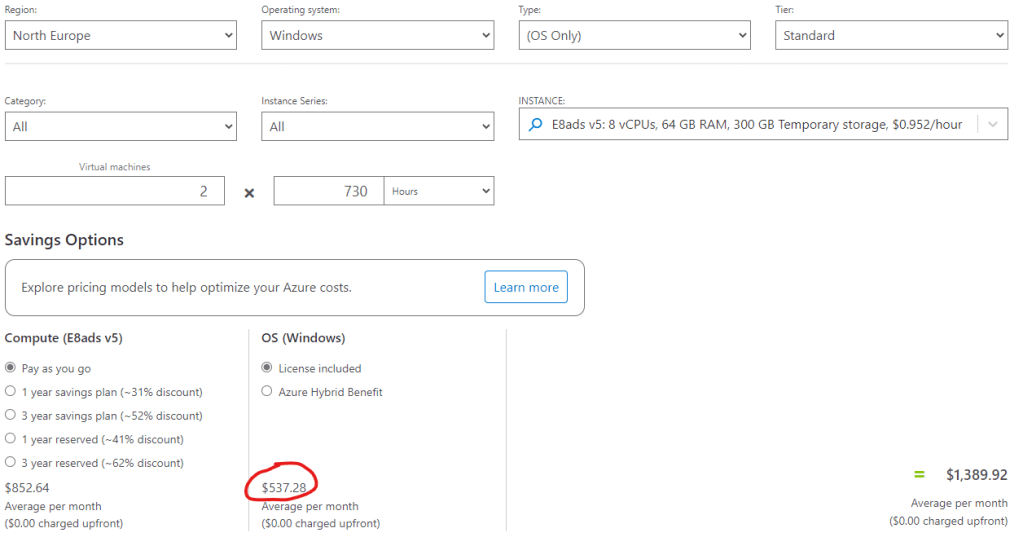
Then if we take a look at the current list price for Windows Server 2022 Standard – 8 Core License Pack 1 Year. We can see it’s currently $213.36 per 8 core pack.

So let’s do the maths.
I need to purchase 2 x 8-core packs (16 cores) subscriptions so that will be 2 x 213.36 = $426.72 for the full 1 year term.
versus
$537.28 per month on PAYG.
So that’s $426.72 per year for the license subscription versus $6,447.36 per year on PAYG.
This is a saving of $6,020.64 over the year – a saving of 93%!
New monthly option for 1 year subscriptions
There’s more good news here. As of October 2022, you can now pay for the 1 year subscriptions on a monthly basis. You are still committed to a 1 year term but instead you pay for this in monthly instalments at 1/12th of the list price each month. This is particularly good news to those who might struggle with cashflow or for service providers who want to charge a monthly price model as it means they don’t have to make that full upfront payment for an annual term.
Note, the 3 year subscription does not have a monthly payment option.
Standard Edition vs Datacenter Edition
You may have spotted that I have quoted Windows Server Standard Edition above and thought “wait a second, Azure virtual machines come with Datacenter Edition”. This is the wrong license”. Not the case. You can use Standard Edition to license your Azure virtual machines even if they are running Datacenter Edition on the operating system.
The benefits of using Datacenter Edition licensing are that you can use these same licenses simultaneously for both on premises virtual machines and Azure virtual machines so if you have a hybrid compute model then this might be cost effective for you. Datacenter Edition is also required if you want to use subscription licenses for a dedicated host in Azure.
Otherwise, Standard Edition is just fine to use for Azure virtual machines and if you are in the process of migrating from on premises to Azure then you can even use Standard Edition subscriptions for up to 180 days to licenses both your on premises virtual machines and your Azure virtual machines as you complete your migration project.
All in all, it’s a pretty great deal.
Backwards / forwards compatibility
A quick note on this. You will see the product name is always the latest edition of Windows Server. At the time of writing, that would be Windows Server 2022. Does that mean I can use this subscription to license an older version of Windows Server? The answer to that is yes, it is backwards compatible.
The good news is that it is also forwards compatible. So for example, if you were to purchase a 3 year subscription for Windows Server 2022, you would also be entitled to use this subscription to license a newer edition of Windows Server.
How to enable this benefit
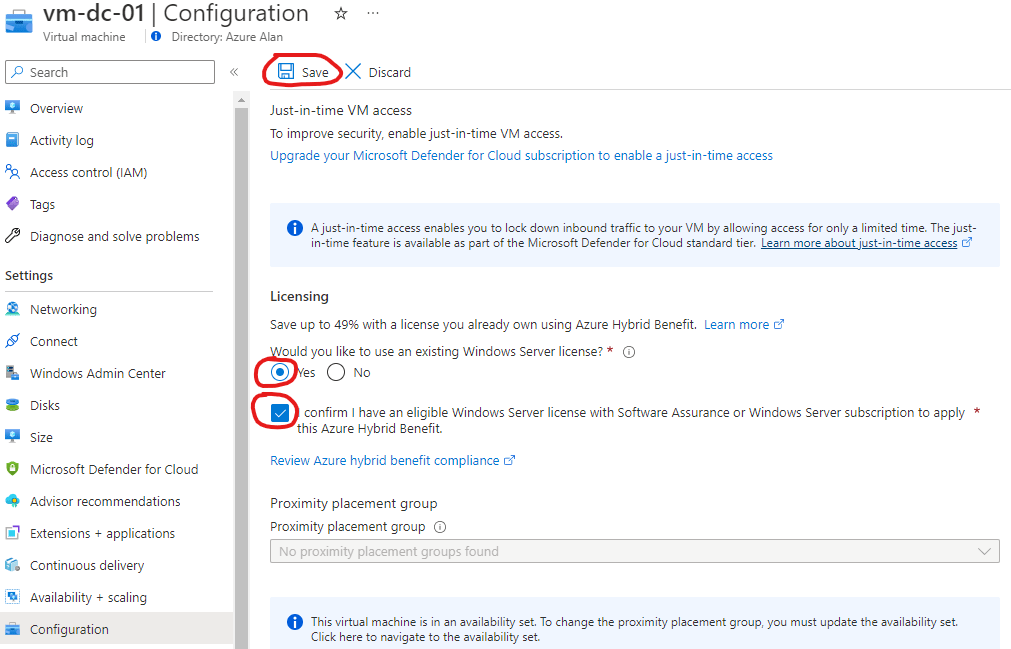
For the license purchase, you will need to contact your license provider. As long as the CSP licenses are assigned to the customer tenant and you meet the requirements mentioned earlier then you are covered from a licensing perspective. The only additional step is to make sure to enable AHUB on your virtual machines where you want to use this benefit. If you do not complete this step then you will still be charged for Windows Server licensing at the PAYG rate. So you are effectively paying twice for the licenses.
This is enabled through the configuration section of the virtual machine resource as shown below. Don’t forget to click the save button.
Why would I not use AHUB for Windows Server?
This seems like a “no brainer”, right? Why would you not do this?
Well, there’s a few reasons where it may actually not be cost effective but really it comes down to your particular use case and your future requirements. Unfortunately, this means you will have to do some calculations yourself to decide if it’s beneficial for you or not and I believe this is why most people don’t use AHUB because it takes a little effort. A little effort can offer a big reward however.
Here’s some situations where AHUB may not be useful:
- Remember, it’s a license commitment. You will be locked in for at least 1 year. If you are expecting to decommission some of your virtual machines in the coming months then it may be more cost effective to continue to license on a PAYG model as there is no commitment with this, you pay for what you use. Having said that, using a 1 year subscription can often work out cheaper after only a few months of use so you will need to do the maths.
- Burstable virtual machines. The Bs virtual machine family has a different licensing model. As you are only using a portion of the compute cores you are therefore not charged the standard “per core” license costs on the PAYG model. For instance, the B2s virtual machine may only cost around $6 per month for Windows Server licensing. In other words, it’s cheaper to use the PAYG model here. In fact, it’s only when you use a B8ms size or larger where it will be beneficial to use AHUB.
- Deallocating virtual machines. As you probably know, by deallocating a virtual machine in Azure you stop paying compute costs when it’s deallocated but also the licensing costs stop as well. Therefore, if you are running virtual machines at reduced hours it may also be cheaper to stick with PAYG licensing. Again, you will need to do the maths on this to confirm but in a lot of cases using the benefit of AHUB can still be a cheaper alternative.
What about SQL Server?
Yes, I did mention SQL Server licensing is another option for AHUB. The rules are slightly different with SQL Server. You instead purchase in packs of 2 cores and there is a minimum requirement of 4 cores per virtual machine for both Standard and Enterprise Edition.
Unfortunately, the savings are nowhere near as big here. Depending on your usage and transaction currency you might save a few percent over a 1 year term but over a 3 year term there is a slightly bigger saving.
However, you won’t really see the benefit of the savings until close to the end of the term. All in all, you might end up getting a month or two licensing for free on a 3 year subscription term versus the PAYG pricing so in my opinion it’s usually not worth the commitment lock in of the subscription term over the flexibility of PAYG pricing.
In conclusion
Hopefully this post has simplified how AHUB works. I believe the new monthly payment option for the 1 year term really helps, particularly for those providing a managed service or a packaged offering as it ties up nicely with other pricing models such as Microsoft 365.
The savings can be massive here, all it takes is a little bit of effort and admin work but at the end of the day it’s just another license so it should be something IT providers and IT professionals are well used to.
 azurealan.ie
Hi Alan,
great write -up – Thank You!
One small doubt:
Does anything change regarding the server CALs when I use AHUB?
As in the FAQ the statement is: (https://azure.microsoft.com/en-us/pricing/licensing-faq/)
“Windows Server CALs are not required for accessing Windows Server running in the Azure environment because the access rights are included in the per-minute charge for the Virtual Machines. Use of Windows Server on-premises (whether in a VHD or otherwise) requires obtaining a separate license and is subject to the normal licensing requirements for use of software on-premises.”
LikeLike
Hi Ben, as licensing in Azure is “per core” based therefore no CALs are required. So whether you decide to use AHUB or not, you will not require CALs for Azure with Windows Server and Microsoft SQL Server.
LikeLike
awesome! Thanks for the quick response!
LikeLike
Good write up. One thing you may want to check is the 16 core min. buy in requirement. I know this was required with on premise physical hosts hosting VMs, I don’t think it’s needed for licensing Azure server vms. If you go to the Azure Hybrid Benefits Savings calculator, it asks you to, “Enter the number of core licenses you own that are covered with active Software Assurance or Windows Server Subscriptions” When entering only 8 it shows you are covered for 1 VM with 8 cores or less. This faq also only describes 8 cores are needed (at a minimum) https://azure.microsoft.com/en-us/pricing/hybrid-benefit/#faq See the question, “What does Azure Hybrid benefit offer for Windows Server on Azure Virtual Machines”. Microsoft certainly doesn’t make it easy.
LikeLike
Thanks for the comment. It was a requirement at the time this article was written although the Microsoft AHUB calculator still didn’t account for this.
However, the good news is Microsoft have since removed this requirement so there is now no minimum purchase. Still 8 cores minimum per VM however.
LikeLike
Alan, thank you again for the info and quick reply. Would you happen to have a link or other documentation from Microsoft that explicitly states the 16 core minimum is no longer required for Azure VMs using hybrid benefit? Or anything from MS where they have removed this requirement?
LikeLike
I don’t have a link to the licensing terms documentation as it’s probably just been updated there somewhere but there are several sites that have blogged about this change in April 2023 such as this one: https://www.licensingschool.co.uk/licensing-blog/2023/04/24/windows-server-2022-licensing-changes/
LikeLike
Is it not possible to just purchase a new SA and apply it to existing VM’s? You said above you’re out of luck, but why? Where does it say you cannot purchase new and apply?
LikeLike
Right here: https://www.microsoft.com/en-us/licensing/licensing-programs/software-assurance-getting-started
It’s a two year license agreement that must be taken out at the time of purchase and extended then each year in order to retain the benefits. There’s no option to purchase SA as a standalone item.
LikeLike
Thanks. I did read the info in the website you sent but I don’t see it say anywhere that you cannot just purchase a new SA and apply AHB to your existing VM’s in Azure. I understand its a 1 or 3 year commitment which is ok. Am I missing where you are telling me to read it?
LikeLike
The company I work for sells Microsoft licenses, SA can optionally be purchased with the license agreement but not at a later date. The exception is with retail/OEM versions in which case you still only have 90 days.
“Software Assurance is purchased when an organization buys or renews a Volume Licensing agreement. It is included
with some agreements and is an optional purchase with others. Whether an organization chooses to add Software
Assurance to their Volume Licensing purchase or it is included with their Volume Licensing program, they can begin
using their benefits immediately and throughout the term of their license agreement.”
Here’s a link to the volume licensing guide if you need to read it for yourself. https://www.licensingschool.co.uk/wp-content/uploads/2016/04/Microsoft_Volume_Licensing_Reference_Guide-April-2017.pdf
LikeLike
I think there is a misunderstanding. I am saying, lets just buy a new volume license for 100 cores and buy it with SA. I am not saying, lets buy SA after we purchased those 100 licenses. At the same time!
LikeLike
Yes, you can do this if you want as long as it makes sense financially to do so.
LikeLike
Thanks! From what I understand the cost of 16 cores on a 3 Year SA is $960. So if we divide that by 3 to get the yearly, it’s $640 a year. The cost for a D4s v5 VM (only Windows licensing) is $134.32 a month on PAYG model. For that we will only need 8 cores so its $320 a a year. It is much cheaper to get that 3 year SA going (yes we will definitely be running those VM’s in 3 years) as we will save a ton of money! Thanks again!
LikeLike
Dear Sir,
I am from India. We have purchased perpetual Windows 2022 Std. edition license. Can we use this with Azure VM in Hybrid mode? Please answer.
Regards,
Kamlesh
LikeLike
No, perpetual software does not come with software assurance so is not eligible. Only 1 or 3 year software subscriptions can be used.
LikeLike
Hi Alan,
I am trying to use a Windows Server Standard Edition Subscription in a new Azure virtual machines running Datacenter Edition with AHUB, but it isn’t working.
Do you know if this is still possible? Or how can I configure? I didnt find documentation for that.
Thanks for your help
LikeLike
Hi Natalia, if you have a valid subscription for Windows Server Standard then you just need to enable the AHUB benefit from the configuration tab of the virtual machine in the Azure portal. The OS stays the same but you are entitled to use your license subscription to use it.
LikeLike
Thanks Alan!
AHUB is enable and I try with Windows Server 2022 Standard – 8 Core License Pack 3 Year Subscription and Windows Server 2022 Standard – 2 Core License Pack 3 Year, but doesnt work. Anything else?
LikeLike
Natalia, you don’t need to activate the license pack in Azure. It should automatically activate the datacenter edition. Once it is active, then you just enable the AHUB without entering any license keys and that’s it.
See here if for troubleshooting activation issues: https://learn.microsoft.com/en-us/troubleshoot/azure/virtual-machines/windows/troubleshoot-activation-problems
LikeLiked by 1 person
Just came back to tell, this is still by far the best blog about how AHUB works using Subscription 😉
Anything changed what would be relevant to insert here?
I did not found any more recent changes by MS about this topic
Cheers
LikeLike